
Set up your shop
Your shop, your assumptions.
- Labor rate
- Monthly operating costs
- Productive machine hours
- Real machine speed
- Concurrent capacity
- Handling time
- Target markup
Does your usual stitch rate
actually work for your shop?
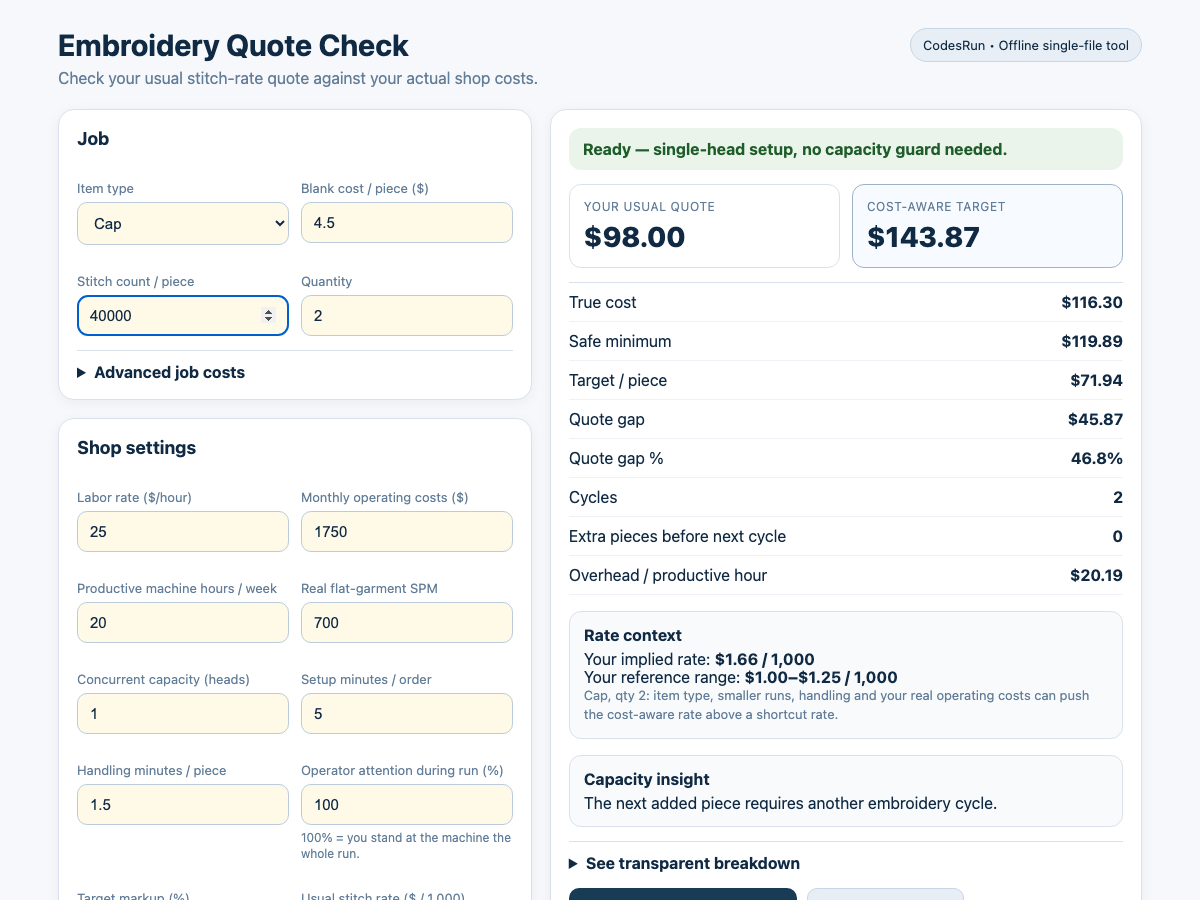
Compare your normal embroidery quote with a cost-aware target built from your real machine speed, labor, operating costs, handling time and concurrent capacity.
Starter example: 2 caps, $4.50 blanks, 40,000 stitches each, one head, $25/hour labor, $1,750 monthly operating costs, 20 productive hours/week, 700 base SPM × 0.85 cap factor, 20% markup and 3% fee. Other v0.7.2 defaults apply; no extras.
Many embroidery shops use simple rules such as a price per 1,000 stitches. That can be useful — but the rule does not know your shop.
The question is not “What is the one correct embroidery price?”
“Does the pricing rule I use make sense for my shop?”
Your shop, your assumptions.
Four essentials. Extras when needed.
See the economics behind the quote.
A 6-head machine stitches up to 6 identical pieces at once. Twelve pieces need 2 cycles. Thirteen need 3.
The model rounds quantity ÷ concurrent capacity up to a whole cycle. It does not use a simple linear division.
Extra pieces are not free. Blanks, handling and other per-piece costs still increase, even when another embroidery cycle is not needed.
A safety reference checks whether entered operating costs are consistent with the selected capacity.
Operating-cost profile is consistent enough with the selected capacity.
Costs are below the safety reference, but results remain visible.
Costs are unusually low for the entered capacity. Cost-aware target numbers are hidden until you review the settings or explicitly confirm the entered costs.
The guard applies only at capacity ≥ 2. An override is tied to the exact capacity, monthly operating cost and safety-floor values. Changing any of those values invalidates the override.
Choose the quick interface or work directly in the spreadsheet.
Fast offline quote check for a computer. Double-click and it opens in your browser. No account, no cloud, no internet connection required.
Spreadsheet version of the same pricing model. Protected against accidental formula edits, with editable shop settings.
Setup guide, explanation of every result, saving/export instructions and safety-check documentation.
The HTML tool and workbook keep separate settings. With identical settings, they return identical results.
If an input cannot produce a defensible result, the toolkit stops instead of quietly printing a misleading price.
The v0.7.2 build pipeline includes 84 engine assertions, parity testing across 37 scenarios × 18 values, real workbook recalculation through LibreOffice, and browser smoke testing of the built HTML tool.
The purpose is to verify that the HTML tool and Excel workbook stay mathematically aligned. Browser smoke testing checks for JavaScript errors; it is not a complete assertion of every displayed result.
The current model does not individually model thread color changes, rejects/remakes, rush fees, artwork revisions, shipping, or all differences between one multi-head machine and multiple separate single-head machines.
These can still be accounted for through the available cost inputs where appropriate, but they are not dedicated variables. Reference-rate ranges are user-editable, not a universal market price.
Nothing is saved automatically. Press Save settings on this device. Saved settings stay in that browser on that computer if local storage is available.
Save normally as a spreadsheet.
No account required. No cloud required for the HTML tool. Pricing data is not sent to CodesRun by the offline tool.
No. It is a downloadable toolkit purchased once.
No. It compares your current pricing method with a target based on your own inputs and assumptions.
The HTML tool is primarily for computer use. On a phone, use the workbook in a compatible spreadsheet app.
No. They keep separate settings. With identical settings they produce identical results.
Yes, concurrent capacity is part of the model. Multi-head users must enter realistic operating costs.
No. In the HTML tool, explicitly press “Save settings on this device.” Saved settings stay in that browser on that computer if local storage is available.
Built around the economics of your shop.
Start with the START-HERE guide included in your download.
For product help, keep the product name and your order information ready when contacting support.
Contact supportThe HTML tool and workbook may keep separate local settings. Product-specific instructions live on the product page and inside START-HERE.